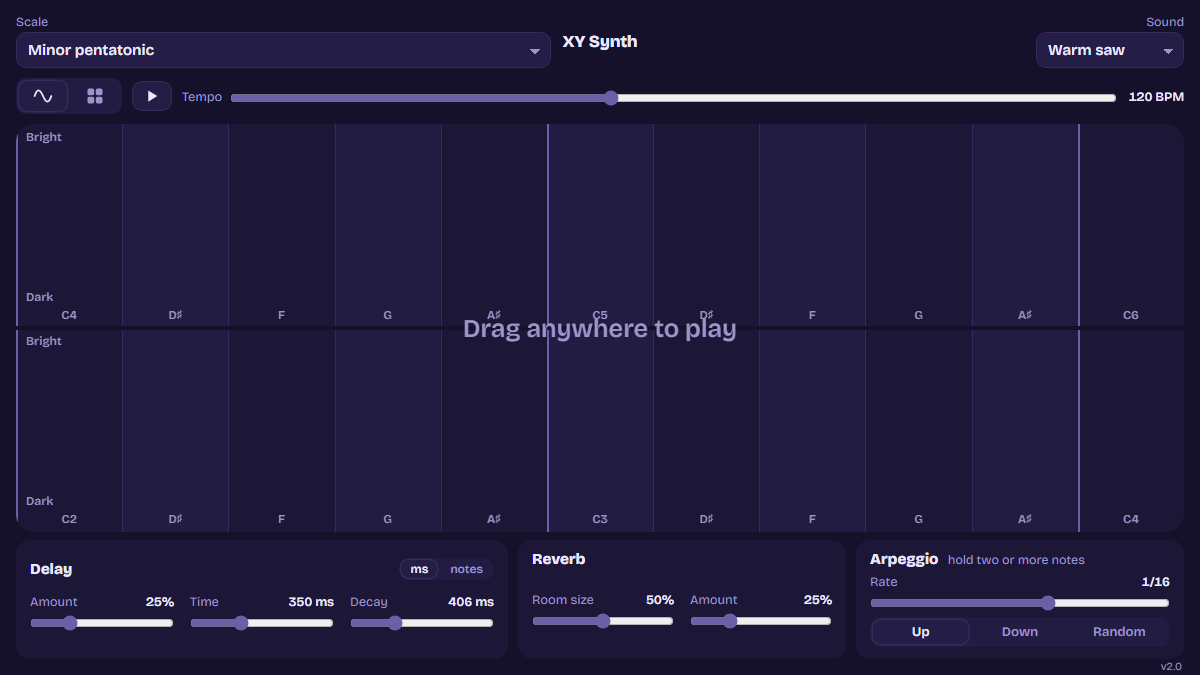
I wanted an instrument that felt more like drawing than playing keys. The XY Synth turns the screen into one big pad: move left and right to change the note, up and down to make the sound brighter or darker. Every note snaps to a scale, so it's hard to play anything that sounds wrong.
It works best on a phone or tablet, where you can use more than one finger. On a laptop you can still play it with the mouse.
How it plays
- One finger plays a held note that slides as you move.
- Two or more fingers start an arpeggiator that steps through the notes you're holding, in time with the tempo. Each note keeps the brightness of the finger holding it.
- Two stacked keyboards give four octaves, each row with its own sweep from dark to bright.
- Delay and reverb, with delay times you can set in milliseconds or in note values that follow the tempo.
- A beats view with a 16-step drum machine, synthesised 909 and 808 kits, and a Break kit that chops a loop you load into eight slices.
How it's made
It's a single HTML file with no libraries and no build step. All the sound comes from the browser's Web Audio API: oscillators and filters for the synth voices, shaped noise for the drums, and a generated impulse response for the reverb. The arpeggiator and sequencer schedule notes slightly ahead on the audio clock, so the timing stays tight even when the page is busy.
I come at this from animation and sound design rather than engineering, so I built it with Claude Code, one small change at a time, testing each version on my phone. A version number in the corner told me when a new push had landed. It was a good way to learn how a synth actually works underneath, rather than just turning its knobs.
The code is on GitHub at twiyks/fingersynth.